01The Afternoon I Lost to a Hand Icon
I spent an afternoon trying to fix what I thought was a permission setting.
I use Claude for Chrome to read pages, click buttons, and fill fields. On most sites, it saves me time. On Facebook, the permission prompts made even basic navigation exhausting.
On Facebook, reading the page and clicking around each triggered a prompt. The hand icon at the bottom of the side panel read "Ask before acting," and its tooltip said: "This site requires permission for each action."
I assumed I had changed a setting during an earlier session and needed to undo it.
I started with the extension itself.
02The Reinstall Reflex
I started by uninstalling and reinstalling the extension, expecting that to clear any local permission settings.
When I opened Facebook again, the prompts were still there. I began to suspect the restriction came from outside the local extension settings.
03The Tour of Every Settings Panel That Could Not Help Me
I kept looking through the available permission controls.
Under Settings, Permissions, I found a section called "Your approved sites." Mine said:
No sites have been approved yet.
The list was empty. I could neither revoke a Facebook approval nor add one from that page.
I also checked Chrome's extension site-access controls and my account settings on the web.
I could not find a toggle that would remember my approval for Facebook.
04The Screenshot That Ended the Argument
Eventually, I read the permission prompt closely instead of dismissing it.
"New permissions required." Claude wants to read page content on: www.facebook.com. Two buttons: Allow this action. Decline.
The explanation was in small grey text at the bottom:
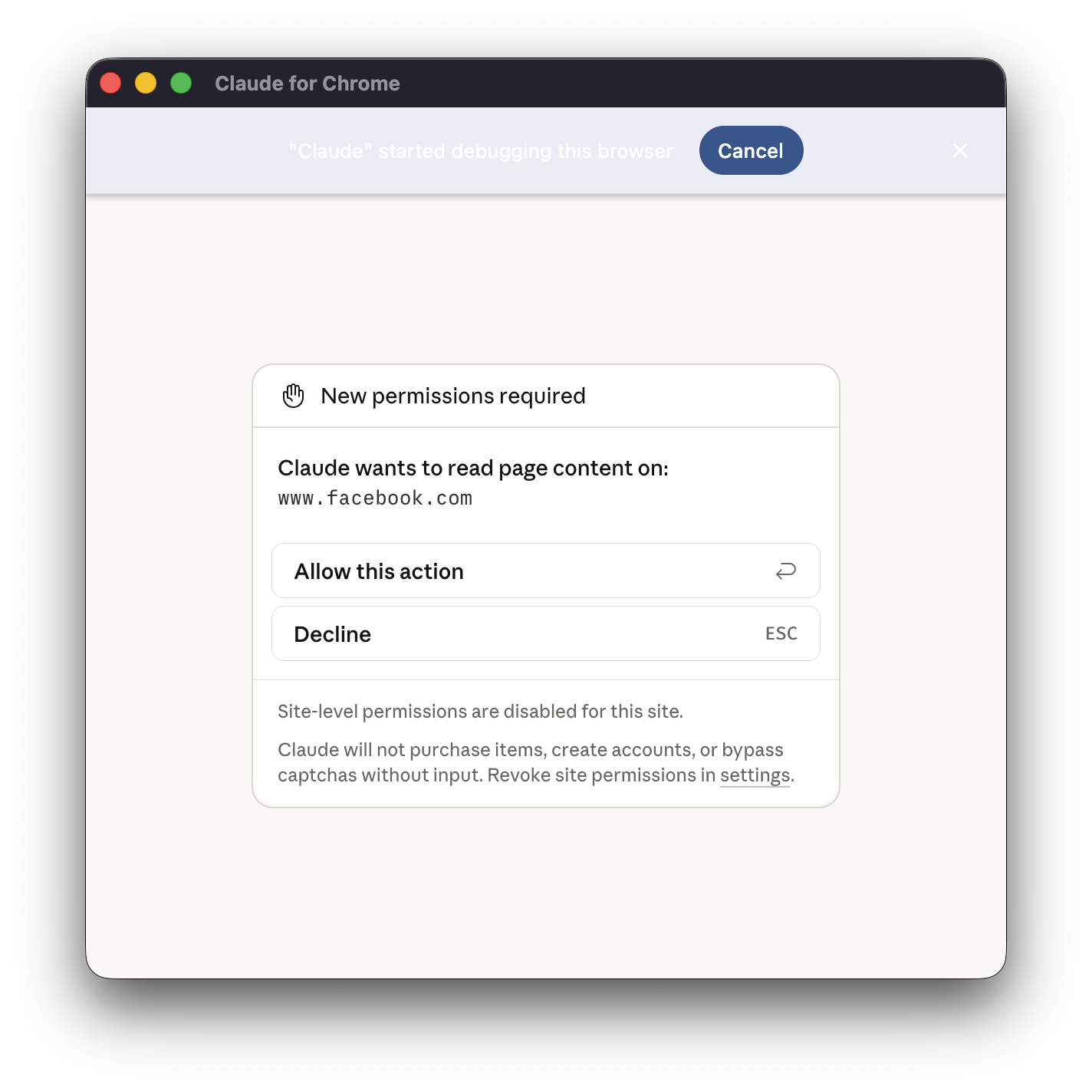
Site-level permissions are disabled for this site.
On other sites, the prompt offers "Always allow actions on this site," which adds the site to the approved list. On Facebook, I only saw the options to allow or decline the current action. The prompt also said Claude would not purchase items, create accounts, or bypass captchas without my input.
The prompt indicated that site-level approval was disabled for Facebook. Reinstalling the extension or clearing my approved sites could not change that restriction.
05How Gmail Handles Approval
What frustrated me most was how differently the same extension behaved in Gmail.
In Gmail, Claude reads my inbox, understands a thread, writes a complete, well-formed reply, and drops it straight into my Drafts, all of it, without stopping to ask permission for each step. It does the entire job. The one thing it will not do is hit Send. That single irreversible act it hands back to me, every time, and I am glad it does.
I prefer that workflow. I can review, edit, or delete the draft before sending it. The approval comes at the point where the message leaves my inbox.
On Facebook, I was asked to approve reading and navigation as well. Those prompts interrupted the preparation long before I reached a publishing decision.
06The Gate Is in the Wrong Place
I would move the approval to the action that publishes or sends something.
Publishing a post, sending a DM, leaving a comment, or sending a friend request should each require approval. I would like Claude to prepare the content and wait for me to take that final step.
Repeated prompts made me less attentive. After clicking "Allow" forty times an hour for routine navigation, I could easily approve action forty-one out of habit, even if that action posted publicly. I want the prompts to remain decisions I read carefully.
The Gmail workflow gives me a useful example to ask for: prepare the content, then wait for my approval before sending it.
07What I Actually Want
I still want explicit approval for publishing a post, sending a DM, leaving a comment, or sending a friend request.
I want to review a completed draft in the compose box before I approve Publish or Send. The Gmail workflow already lets me work that way.
An approval at that point would be easier to notice and assess than another prompt in a long sequence of reading and navigation requests.
08What To Actually Do (So You Don't Lose Your Afternoon)
If you encounter the same prompt, these checks may save you time:
- Read the prompt. "Site-level permissions are disabled for this site" explains why the persistent approval option is missing.
- Check your approved sites. An empty list does not explain or remove that site-level restriction.
- Expect per-action approval. In my session, reinstalling and changing Chrome settings did not make the extension remember approval for Facebook.
I spent the afternoon looking for a setting I could change. The permission prompt finally explained why I could not find it. My request for Facebook is straightforward: let me review what Claude drafts, then ask for approval before it publishes or sends.